How to Get the API Key and Password of a CoinRemitter Wallet?

Businesses that accept payment in crypto using Coinremitter widely use open-source plugins and crypto APIs. However, getting the API key and password of a Coinremitter wallet is mandatory to connect it to the integration and receive funds in the wallet.
In this article, we will explain how to obtain your wallet’s API key and password.
Steps to Get an API Key and Password
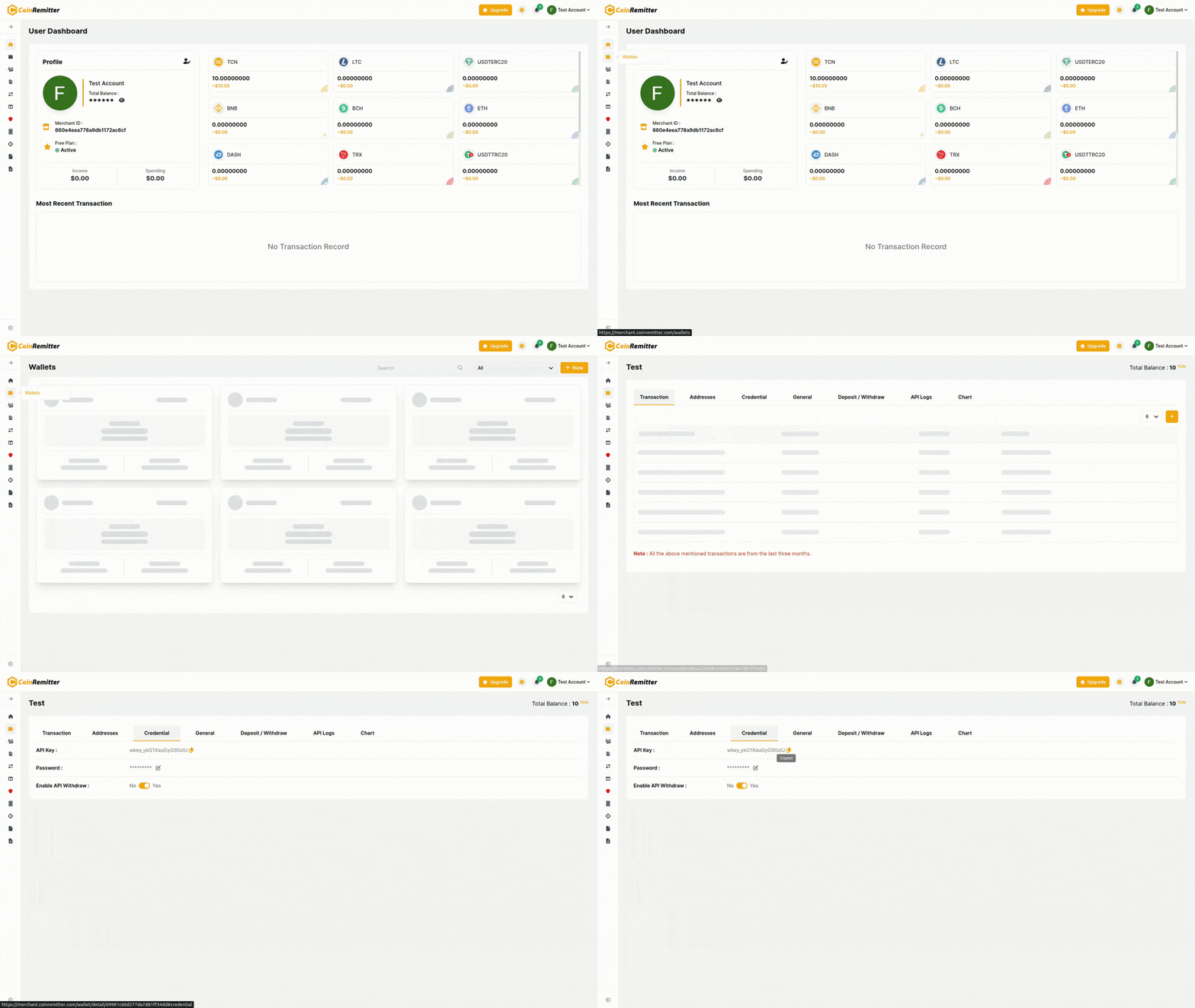
- After registering or signing in on Coinremitter, proceed with creating a wallet. Go to the ‘Wallets’ tab, and click ‘New’.
[Click Here: How to Create a Wallet on Coinremitter?]
- After you successfully create a wallet, return to the ‘Wallets’ tab.
- Find the wallet for which you want an API key and password. Hover your mouse pointer on the same and click ‘View More’.
- Locate the ‘Credential’ tab and click it.
- The API key and password will be displayed under the ‘Credential’ tab. You can use them to connect your wallet to the plugin or to integrate the crypto API.
Some Important Notes
- The wallet password is different from the account/login password.
- You can change the wallet password by clicking the ‘Edit’ icon beside the password in the ‘Credential’ tab.
- We recommend changing your wallet password frequently to avoid security concerns.
Recent News




Over 38,000 merchants are using CoinRemitter
Join them now